What are Competency Assessments and Assessment Templates
Introduction
As well as Competency Tests, where a candidate proves their knowledge by answering a series of questions, iPassport offers the ability to create Competency Assessments. These provide a way to observe and evaluate a candidate’s ability to perform a given procedure. The assessment can also include multiple choice questions (the Checkbox question type). Images can be added to the questions to support the assessment. Where a question has Allow Attachments ticked, the answer can also include attachments, so that documents, forms, images or photos can be uploaded while the assessment is being performed.
When an assessment is being performed, it is the examiner who opens the assessment in iPassport and asks the candidate to either perform a procedure or answer a question, while entering comments about each point.
Assessment Templates refer to the exam document, containing all the questions and settings for it.
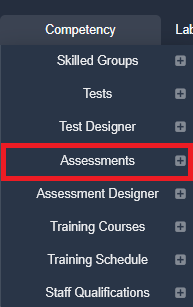
They are accessed through the menu, Competency > Assessment Designer.
Assessments refer to exams (assessment templates) which have been assigned to one or more candidates.
They can be found under the menu, Competency > Assessments.
Note: these are the default menu names. Menu names can be renamed for your organisational unit (OU), so they may appear differently on your system.
The plus signs [+] to the right are shortcuts. The [+] next to Assessment Designer creates a new assessment template, and the [+] next to Assessments opens the screen to assign an assessment to candidates. Each [+] only appears if you have the required permission: Competency:Create/Edit Templates for Assessment Designer, and Competency:Assign Assessments for Assessments.
Next step:
The next article covers Permissions and Requirements to Manage Competency Assessments
You can jump to any of the articles in this collection from this table of contents:
- Competency Assessments - Part 2 - Permissions and requirements
- Competency Assessments - Part 3 - Creating a Blank Template
- Competency Assessments - Part 4 - Adding questions to a Draft Template
- Competency Assessments - Part 5 - Advanced Settings - Steps before publishing an Assessment Template
- Competency Assessments - Part 5a - Examiner Settings (Adv. Settings)
- Competency Assessments - Part 5b - Completion Settings (Adv. Settings)
- Competency Assessments - Part 5c - Reissue Settings (Adv. Settings)
- Competency Assessments - Part 5d - Notification Settings (Adv. Settings)
- Competency Assessments - Part 5e - OU Scope (Adv. Settings)
- Competency Assessments - Part 5f - Reference Documents (Adv. Settings)
- Competency Assessments - Part 6 - Viewing and Assigning Assessments
- Competency Assessments - Part 7 - Performing Assessments
- Competency Assessments - Part 8 - Cloning and Creating New Versions of Assessment Templates
- Competency Assessments - Part 9 - Archiving or Deleting Assessments
Was this article helpful?
That’s Great!
Thank you for your feedback
Sorry! We couldn't be helpful
Thank you for your feedback
Feedback sent
We appreciate your effort and will try to fix the article