Training Courses and Training Schedules
Introduction
This area of iPassport allows a user to create training courses, select trainers and choose a location for the training. Training courses can then be scheduled as ‘New Training Events’ and attendees can be invited to attend. Courses that are held periodically can be reused to create new training events when required.
Attendees who confirm having participated in a training event will have a personal record to their credit in the Training tab of their Staff Profile.
The Training tab has two views: Completed, which is shown by default, and Scheduled, which lists training events the staff member is booked on that have not yet been completed. Either list can be exported to a CSV file.
Training Courses and Training Schedule are located under the Competency menu.
Each menu item is only shown to users with the relevant permission: Desktop:Show Training Courses Menu Item for Training Courses and Desktop:Show Training Schedule Menu Item for Training Schedule. Administrators can see both menu items without these permissions. The training module is only available where the staff module is enabled for your account.
Menu names can be customised for each organisational unit, so on some sites these menu items, or the Competency menu itself, may appear under a different name.
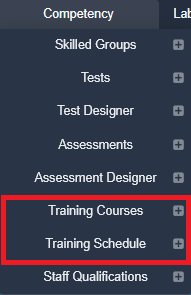
| Note |
The ‘+’ buttons are short cuts and will take a user directly to the add/create screen. The ‘+’ button is only shown to users who can create the item: Courses:Create Courses for Training Courses and Training Events:Create Training Events for Training Schedule. |
Contents
- Training Permissions - permissions required for this module
- Creating Courses - steps to follow to set up training courses
- Scheduling Training Events - existing training courses can be used to schedule training events
Next step:
The next article covers Training Permissions
Was this article helpful?
That’s Great!
Thank you for your feedback
Sorry! We couldn't be helpful
Thank you for your feedback
Feedback sent
We appreciate your effort and will try to fix the article