Companies
Introduction
The Companies module provides a place to register and manage external suppliers, service providers and other entities connected to the organisation. Once added to the system, they can be used as equipment manufacturers, installing companies and service contract providers, maintenance providers, reagent, material and batch suppliers, training course and training event providers, the company on external controlled documents and more.
Existing contacts can be linked to a company from within the company record or in the contact’s record. When contacts are linked to the company they work for, they become accessible and identifiable in activities related to the company (for example, trainers in ‘Training Courses’). A contact can belong to only one company at a time, so adding a contact to a company from the company record moves them off any company they were previously linked to. To be offered as a trainer, a linked contact must also be in the ‘Trainer’ contact group, have their Visibility set to Public and not be inactive.
Company/supplier reviews can be scheduled and recorded within each company record when the Enable Company Approvals account setting is switched on (it is off by default).
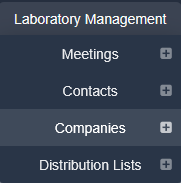
To access the Companies module, please navigate to Laboratory Management > Companies. The Companies menu item is only shown to users with the ‘Desktop:Show Companies Menu Item’ permission.
Contents:
- Permissions and Settings for Companies
- Creating Company Records
- Search and Edit Company Records
- Company-Supplier Reviews
Next Step:
the next article covers Permissions and Settings for Companies
Was this article helpful?
That’s Great!
Thank you for your feedback
Sorry! We couldn't be helpful
Thank you for your feedback
Feedback sent
We appreciate your effort and will try to fix the article